
Table of Content
Digital Discipline: How to Use Social Media Without Losing Focus on Studies

When I first entered university, I didn’t realize how much media could shape both my learning and distractions. Over time, I learned that having a clear strategy for online use is as important as preparing lecture notes. By treating my social accounts like a mini department of growth, I started maintaining focus while still building a professional presence. A carefully crafted approach meant that my personal interest in study groups or educational pages was properly expressed without falling into endless scrolling.
This shift reminded me of how a marketing overview works in an office setting: every post, message, and notification should feel intentional, not random. I began creating short schedules for communications, almost like guiding my own employees, which helped in developing discipline and following priorities. In addition, reading articles or joining study communities felt more engaging when I viewed them as tools rather than distractions. Once this mindset was adopted, the time spent online actually started to support my learning journey instead of pulling me away.
What is social media?
Social media is an internet-based space that brings together users in virtual worlds where they create, exchange information, and build connections through conversations, photo-sharing, video-sharing, podcasts, blogs, or even micro-blogs. These platforms and sites allow instant communication, messaging, and sharing, turning content into interactive experiences. I’ve often relied on educational wikis, collaborative networking, and study-driven widgets on the web, showing me that this form of digital life including academic groups and resources can shape discipline when used with intention.
What are the benefits of using social media?
When I first started exploring social media, I realized it wasn’t just a place to entertain myself it was a digital ecosystem where people, professionals, and friends could truly connect and learn. Whether you’re a student or already part of an industry, these platforms help you build a strong network, share valuable knowledge, and gain new perspectives from billions of users around the world. I’ve personally used these channels to develop my communication skills, elevate my ideas, and engage in conversations that made me more confident in my field.
Beyond personal growth, social platforms can strengthen your brand, expand your audience, and even help you broaden your interests. For students, this means turning a casual scroll into a moment to learn, communicate, and use information productively. Whether you’re following a company update, joining a study group, or exchanging feedback with a mentor, these micro-interactions slowly build your professional identity. The beauty lies in how small digital connections can develop into real opportunities transforming how we grow, connect, and think at every level of learning.
Should I create social media accounts for my department?
When I helped a manager at our university design a plan for the department’s online presence, I realized how important it is to treat social media as a structured business tool, not a casual space. Every account should have a focused purpose, with authorized employees who manage and share valuable content. Whether it’s building a team page or connecting through networking sites, clarity in how each profile is used makes all the difference. A simple yet strategic approach ensures that updates are done responsibly, keeping your digital voice aligned with the department’s goals.
From my experience, one well-managed and active page can speak louder than several scattered accounts. It helps maintain professional contact, promotes unity within the group, and creates trust across the academic and digital community. When social media pages reflect a clear identity and consistent tone, they elevate the department’s credibility showing that smart communication isn’t about quantity, but about focus and purpose.
What social media sites should my department be on?
When a department wants to create an official account, it’s important to think about the goals, the audience, and the type of content you plan on sharing. From my own study and practical work, I’ve seen how many companies rush into launching on every site, which can dilute their brand and make communications less effective. The right strategy is to be aware of where your users are most active and decide which social media platforms are truly appropriate for your department. Often, even one official page on a popular site like LinkedIn or Instagram is enough if posted with consistency, rather than spreading yourself thin across too many platforms that may not be conducive to your purpose.
Warning Signs You’re Losing Focus

One of the first signs that social media is becoming problematic is when the amount of time you’ve spent scrolling far outweighs your school or work priorities. I’ve noticed this in my own habits a quick check of posts suddenly turns into hours using devices late at night, and the next morning feels heavy because sleep is disrupted. This pattern not only indicates distraction but also slowly starts to impact different aspects of life, from missed assignments to neglect of face-to-face interaction with friends.
Another warning sign is when feelings turn negative after engaging online. Constantly comparing yourself unfavorably to content you see can lower self-esteem and lead to anxious, jealous, or even depressed moods. I’ve seen people become envious of the likes, comments, and shares that others receive, and this pressure to respond quickly or enthusiastically can make the use of these platforms feel less like fun and more like a burden. Over time, this worsening cycle can spark anxiety, depression, and other symptoms that may alleviate temporarily but often worsen if not addressed.
Sometimes the interaction itself can be risky. Cyberbullying, unsafe material, or embarrassing pranks can create serious consequences. I recall a student who shared dangerous content while driving his phone, which not only put him in unsafe situations but also showed how engaging in such behavior is driven by peer motivations rather than rational thought. These reactions show how social media can distract and push someone into risky choices, leaving little control over how they act or think in the moment.
Finally, a subtle but equally telling sign is when offline life feels less fulfilling. If you’re substituting real friends with virtual interactions, constantly distracted by light from screens late at night, or suffering from sleep problems, it’s time to reassess. The frequency and number of times you use these sites may look normal to everyone, but deep down, it’s worth reflecting on how these patterns affect your self, your ability to grow, and your everyday motivations.
Mastering Screen Time: Setting Boundaries With Apps and Digital Tools

For students, learning how to use screen time wisely isn’t about quitting apps it’s about applying smart, practical tools that protect your focus, sleep, and energy. I’ve seen that even the built-in features on phones can actually act as a guide, helping readers and learners turn uncontrolled habits into high-value routines. Setting limits on notifications, creating tidy schedules, and treating distractions like an enemy gives you back those few short moments each day that add up to better mental balance. This subsection reminds us that discipline isn’t about restriction it’s about choosing boundaries that will support growth and consistency.
5-step app-based plan (doable in minutes)
- Step 1 – Quick Audit (5 min): Start by taking just five minutes to note which apps are constantly open and stealing your screen time. Identify the top 3 that hurt your digital wellbeing the most, and write them down. This short reflection often shows how much of the time is slipping away unnoticed.
- Step 2 – Set Hard Limits: Whether you’re on Android or iOS, both have built-in settings to use strict app limits for social and entertainment platforms. Put timers of 30–60 minutes on the most distracting apps, and start by adjusting daily minutes until the habit sticks.
- Step 3 – Schedule Focus Blocks: I personally rely on the Pomodoro mode, which helps me study in sprints of 25–50 minutes with short breaks. These structured focus blocks prevent random alerts from disturbing weekdays, and you can even activate automatic settings to make sure they do not disturb your study rhythm.
- Step 4 – Create Downtime: Right before bed, schedule downtime of 45–60 minutes with no device alerts. Cutting off blue light at night not only protects sleep but also makes mornings calmer and more productive.
- Step 5 – Review Weekly & Adjust: At the end of each week, check your progress, celebrate wins, and see if you need to tighten any limit. A simple weekly report can guide the next small change, and focusing on one adjustment at a time makes the plan sustainable and motivating.
Tools that actually help
- Sometimes the best tools that actually help are the ones already built into your phone. iOS Screen Time and Android Digital Wellbeing features like Focus Mode or Bedtime can automatically block distractions, track your usage, and remind you when you’ve crossed limits. I’ve personally used these settings during study hours, and they made it easier to stick to boundaries without constant self-control battles.
- For those who want extra support, third-party apps can be a game-changer. Forest keeps you motivated by turning focus into a reward, while Freedom works as a strong shield for site or app blocking. If you’re curious about where your time really goes, Rescue Time provides detailed usage analytics, helping you reflect and redesign habits in a smarter way.
Micro-habits that stick
- Phone face-down and out of reach during study.
- Turn off non-essential notifications (only essentials remain).
- One tech-free hour before sleep read, walk, or stretch.
Quick reminder
Here’s a quick reminder: don’t try to punish yourself with extreme detoxes or forceful enforce methods. Instead, align your intentions with realistic tweaks. This way, you gradually beat apps, improve study quality, and simply feel better without the burden of dramatic changes.
Smart Social Media Use for Learning (Groups, Study Communities)

When students join social media groups or online communities with clear intention, these platforms can become a powerful tool for learning, offering tutorial-style videos, shared resources, and support that make study less isolating; from Facebook discussions to YouTube walkthroughs, the right spaces give instant access to ideas that can be used productively, showing that digital connection isn’t only about entertainment but also about building meaningful academic growth.
Why It Works
- Learning where students already are: Learning through social platforms doesn’t have to be boring when students use apps like TikTok, Instagram, and YouTube. What often feels like just entertainment can be turning into something more educational and engaging, especially when content is aligned with study goals. Many learners already spend hours on these platforms, so the shift becomes natural, not forced, and more like an extension of everyday life.
- Better teacher–student communication: Also thrives here. From quick updates, simple polls, or shared resources, Instagram, Facebook, and WhatsApp groups make it easier to ask and answer questions, stay connected, and share notes. Even casual chats or class reminders make studying easier, showing how these tools or spaces can keep a class united and informed when used with intention.
- Support for shy learners: For quieter learners, these online spaces offer freedom to participate and ask without the pressure of speaking in a physical classroom. They can engage more freely, let their curiosity grow, and explore ideas without hesitation. This shift not only supports individual growth but also encourages collaborative learning environments where everyone feels included.
Practical Benefits
- Video learning: One of the practical benefits of video learning is the ability to pause-and-replay difficult lessons. Platforms like YouTube or even TikTok give students the flexibility to go over concepts visually until they click. When a topic feels too tough, this method helps explain it in simple ways and allows learners to move forward at their own pace.
- Study communities: Study communities are another game changer. Online groups let learners collaborate, swap notes, and work on projects together. I’ve seen how students form practice sessions, answer questions, or review assignments on shared spaces. It’s not just academic help, but also motivation to stay consistent when learning or preparing for exams.
- Free resources: Beyond peer support, there’s a treasure of free resources out there. From teacher-made guides, expert tutorials, and digital workbooks, learners get access to quality content at no cost. The fact that people are willing to share what they know makes learning more open and accessible, removing the barrier of money.
- Skill building: Finally, skill building goes hand-in-hand with online participation. Simple acts like recording and posting lessons improve communication, sharpen writing, and encourage collaboration. These interactions builds teamwork, give practical exposure, and even turn basic notes into creative formats others can benefit from.
Challenges to Watch
- Distractions: One challenge students face is distractions from endless feeds that mix entertainment with learning. To prevent this from overshadowing study time, learners must carefully curate what they engage with and set clear intentions before logging in
- Boundaries: Boundaries are equally important. Student–teacher interactions on social media should remain professional, and privacy settings must be adjusted to protect both parties. This ensures digital spaces stay focused on learning rather than personal or inappropriate content.
- Access gaps: Another issue is access gaps: not all students have reliable devices or internet at schools, so institutions must provide support to make online learning equitable. Otherwise, t
The Future of Social Learning
The future of social learning lies in apps and platforms that evolve to be designed specifically for education, offering interactive, community-driven experiences that are globally accessible; students who approach social media with clear intention can use these tools to enhance learning effectively, while a thoughtful guide on how and when to engage helps them use the platforms wisely, showing that it isn’t just about connectivity but also about meaningful knowledge growth.
Daily Routine for Balanced Usage
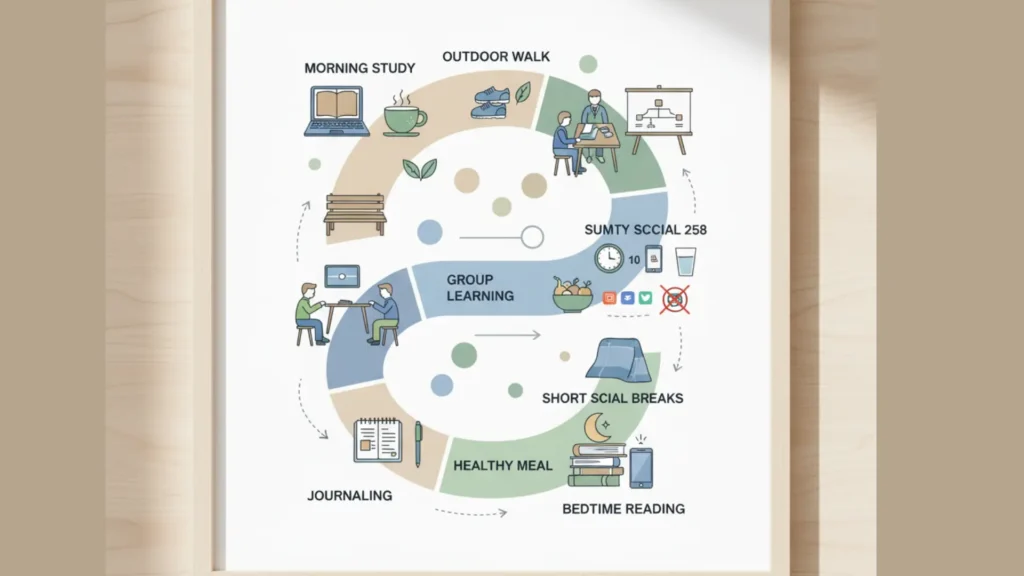
Managing time online is important for students to stay productive and maintain a balanced routine; a clear structure for class, screens, and digital tools helps avoid burnout by letting learners use technology as a tool rather than a distraction, ensuring they eat, take breaks, leave devices up when needed, and plan their day just right without feeling drained, proving that effective habits can make learning smoother and more intentional in all aspects of life.
Morning: Start with Intention
- Tech-free first 30 minutes: Morning: Begin with intention by spending the first 30 minutes tech-free stretch, journal, or read instead of diving into notifications, helping students stay focused.
- Plan your day: Write down 3 key tasks you must complete, creating a structure that keeps time productive and balanced.
- Quick check-in: Only glance at class updates or important emails avoid screens that drain your energy and use technology as a tool rather than a distraction.
Midday: Productive Screen Time
- Focused study sessions: Midday: Keep productive screen time focused with study sprints using Forest or Pomodoro (25–50 min study + 5–10 min break), so students stay sharp and time is well managed.
- Use digital tools smartly: Leverage Flashcards, YouTube tutorials, and study communities to enhance learning and support academic growth without distraction.
- Take eye & body breaks: Follow the 20–20–20 rule and move every hour to prevent fatigue and keep energy levels balanced, ensuring technology remains a tool, not a distraction.
Afternoon: Balance Work and Rest
- Engage, don’t scroll: Use social media for groups, Q&As, and sharing notes.
- Physical activity reset: Walk, stretch, or exercise to recharge.
- To-do check: Review progress and adjust your evening plan.
Evening: Digital Wind-Down
- Screen-light evening: Avoid heavy scrolling 1–2 hours before bed.
- Reflect & prepare: Write down tomorrow’s tasks, clear your workspace.
- Relax offline: Read, meditate, or journal before sleep.
Weekly Add-Ons
- Digital detox hours: Pick one evening or weekend slot to go offline.
- Track & adjust: Use Screen Time (iOS) or Digital Wellbeing (Android) to monitor usage.
- Save smart content: Collect helpful resources and study tools for future sessions.
Balanced Usage Checklist (Do’s & Don’ts)
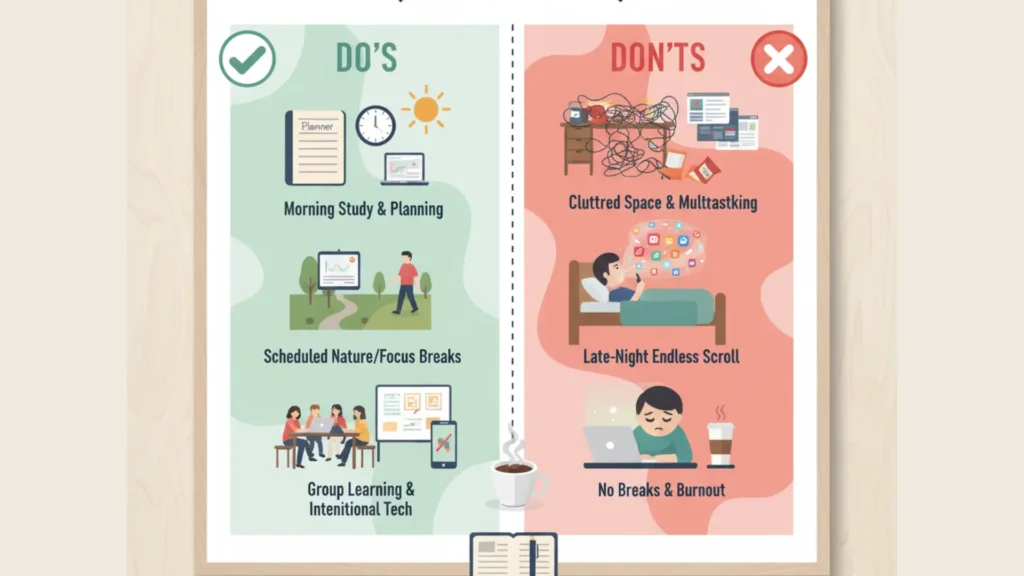
Do’s
✔ Start mornings tech-free
✔ Use Pomodoro for study blocks
✔ Take regular eye & body breaks
✔ Join educational groups & study communities
✔ Review daily progress and plan ahead
✔ Have at least 1 offline hobby or activity
Don’ts
✘ Don’t check social media first thing in the morning
✘ Don’t study with notifications ON
✘ Don’t use your phone 1 hour before sleep
✘ Don’t let entertainment apps mix with study time
✘ Don’t ignore your screen-time reports
A structured daily routine builds focus, better sleep, and stronger academic performance without sacrificing digital life, turning screens into tools with purpose; it’s important for students to use them intentionally, setting goals and knowing when to quit, so digital life isn’t a distraction and contributes meaningfully to academic growth.
Consolation
Mastering Digital Discipline lets you enjoy social media without losing focus on studies, turning screens into a tool for growth rather than a distraction. A structured daily routine, smart tools, and intentional use of digital life builds stronger focus, better sleep, and higher academic performance all while keeping your online world fun and rewarding. With these habits, digital life isn’t the enemy it’s your partner in creating a balanced, powerful, and fulfilled learning journey.
What does digital discipline mean for students?
Digital discipline means managing how, when, and why you use technology especially social media so it supports your academic growth instead of distracting you. It’s about setting boundaries, creating mindful routines, and treating your screen time as part of your learning system.
How can students stay focused while using social media?
Students can stay focused by creating structured schedules, turning off non-essential notifications, and using apps like Forest or Focus Mode to manage distractions. The goal isn’t to quit social media, but to use it intentionally aligning digital habits with study goals.
What are the benefits of digital discipline in student life?
Digital discipline improves focus, productivity, and mental clarity. It helps students sleep better, manage time wisely, and build a healthier balance between online learning and offline life. Over time, this habit strengthens academic consistency and emotional stability.
How can social media help in learning when used correctly?
When used with purpose, social media can enhance learning through study groups, video tutorials, and academic communities. It connects students to shared resources, peer discussions, and expert insights that make learning more collaborative and motivating.
What are the best apps to build digital discipline?
Top apps include Forest (for focus motivation), Freedom (for distraction blocking), and Rescue Time (for screen analytics). Built-in phone tools like iOS Screen Time and Android Digital Wellbeing also help track and limit usage effectively.
How can schools or departments use social media responsibly?
Departments should use social media with a clear plan defining purpose, authorized users, and audience engagement policies. Instead of multiple scattered accounts, one focused page with consistent updates builds trust, professionalism, and effective communication.
Related Articles And Topics


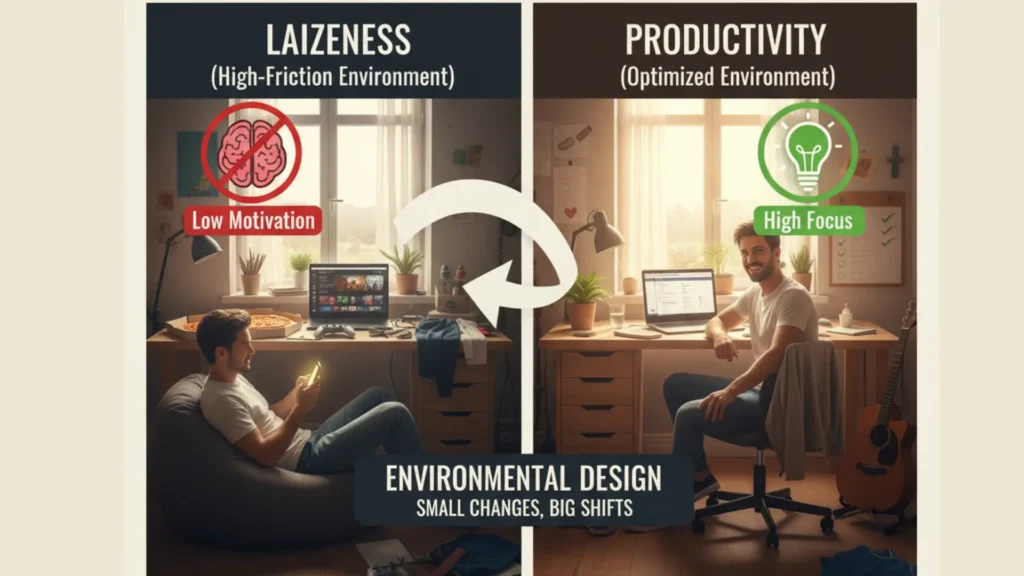









Unlock 150 motivational quotes for students to beat laziness, stay focused, and build confidence. Perfect inspiration for exams, studies, and daily success ,..readmore..